Many administrative workflows still depend heavily on physical documents. Letters, forms, employee records, and supporting documents often need to be scanned before they can be stored or processed digitally.
Windows already provides several applications for scanning documents, but I wanted something simpler: an application that launches quickly, does not require a server, does not upload documents anywhere, can run as a portable application, and still provides a modern user interface.
That need led me to build Scanify.
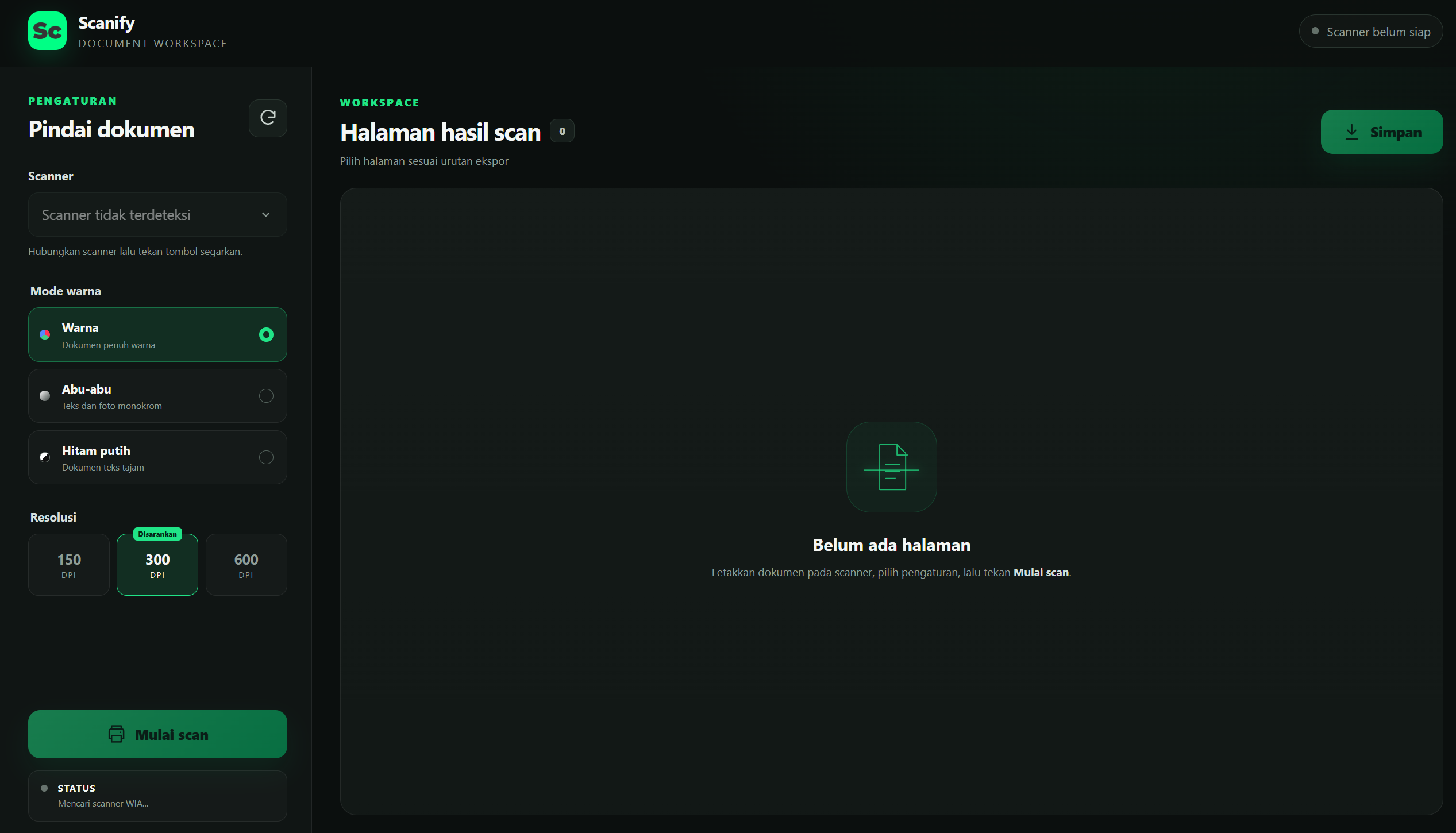
Scanify is a Windows desktop application for scanning, organizing, and exporting documents directly from scanners that support Windows Image Acquisition (WIA).
The application backend is built with Go, while the user interface is built using React and TypeScript through the Wails desktop framework.
For production, the entire application can be packaged into a single Windows executable.
Repository:
https://github.com/fkryakbar/scanify
Why I Built Scanify
Scanify did not completely start from scratch.
The previous version was built using WPF/.NET. For Scanify v2, I decided to rebuild the application using a different approach: Go for native integration and application logic, combined with React for the user interface.
One thing I wanted to preserve from the beginning was simplicity.
I did not want a scanner application to turn into a system that requires a database, background services, user accounts, or a server connection just to scan a document.
The basic principle behind Scanify is simple:
Image processing and file generation happen locally on the user's computer.
Scanify does not upload scanned documents, scanner information, or telemetry to an application server.
Internet access in release builds is only used for things such as checking application updates through GitHub Releases and installing the WebView2 Runtime when necessary.
Features
Although Scanify is designed to remain simple, it already supports a fairly complete document scanning workflow.
The application can detect WIA-compatible scanners connected to Windows and allows users to configure scanning options such as:
Color, grayscale, or black-and-white scanning
150, 300, or 600 DPI resolution
Previewing scanned pages
Selecting pages to export
Reordering pages
Removing unnecessary pages
Exporting pages as JPG
Combining multiple pages into a single A4 PDF document
Page numbers are automatically reorganized when a page is removed, keeping the document sequence consistent.
Exported files also use unique filenames to reduce the risk of accidentally overwriting existing documents.
At the moment, Scanify targets Windows 10/11 x64 and scanners that provide WIA drivers.
One of the devices currently used for testing is the Canon MP280 series, so compatibility with more scanner models is an area where contributions and community testing would be especially useful.
Why Go + Wails?
One of the most interesting parts of the project is not necessarily the scanning functionality itself, but how the desktop application is structured.
React handles the user interface.
Through Wails bindings, the frontend can call Go functions almost as if it were calling an API, but without running a separate HTTP backend.
On the Go side, responsibilities are separated into several components.
wia_windows.go handles communication with Windows Image Acquisition through COM.
session.go manages temporary pages, page selection, ordering, and resource cleanup when the application exits.
exporter.go handles JPG export as well as PDF generation and validation.
For PDF processing, the project uses pdfcpu, while COM communication is handled using go-ole.
The frontend is built with React, TypeScript, Vite, and Vitest.
The Interesting Part: Talking to a Scanner from Go
Building a desktop interface with React is relatively familiar territory for web developers.
The more interesting challenge appears when the application needs to communicate directly with Windows scanner hardware.
Scanify uses Windows Image Acquisition (WIA), a Windows API that provides an interface for communicating with image acquisition devices such as scanners.
Because WIA relies on COM, the implementation is not as simple as calling a REST API from the frontend.
In Scanify, WIA communication is handled by a dedicated worker so that COM operations run on the appropriate Windows thread.
This architecture keeps hardware interaction separated from the UI and from the rest of the document-processing logic.
As a result, React does not need to know anything about COM, WIA, or the internal behavior of a scanner.
From the frontend's perspective, the workflow is much simpler:
Find scanners
↓
Select scanner
↓
Choose DPI and color mode
↓
Scan
↓
Receive pages
All Windows-specific communication remains behind the Go application layer.
This is one of the reasons I find Wails interesting.
It allows developers to keep using the web frontend ecosystem while still having access to Go for native operating system integrations.
Local-First by Design
Privacy is especially important for scanning applications.
Scanned documents may contain official correspondence, employee information, financial documents, identification records, or other sensitive internal documents.
Because of that, Scanify follows a local-first approach.
There is no Scanify backend receiving scanned documents.
There is no automatic file upload.
There is no document telemetry.
Files are stored only in locations selected by the user, while temporary files created during a scanning session are cleaned up when the application closes.
This approach also makes the application architecture much simpler.
There is:
No database.
No authentication.
No cloud storage.
No permanent backend server.
For a desktop utility, sometimes the best architecture is not about adding more components.
It is about ensuring that every component exists for a clear reason.
Portable by Default
Another goal of Scanify is to make the application as simple as possible to use.
Production builds can generate a portable Windows x64 executable.
Users do not need to install a Scanify backend or run a separate application service.
The experience is essentially:
Download
→ Run the EXE
→ Select a scanner
→ Scan
→ Export
Wails uses Microsoft Edge WebView2 to render the user interface.
Release builds can also include the WebView2 bootstrapper so Windows can install the required runtime if it is not already available on the user's machine.
Updating a Portable Application
Portable applications introduce another interesting problem:
How do you distribute updates without introducing a complicated installer?
In release builds, Scanify can check GitHub Releases for newer versions.
When an update is available, the user still decides whether they want to download it.
Downloaded executables are not immediately trusted or executed.
Scanify verifies the downloaded file using its expected file size and SHA-256 checksum.
Only after the verification succeeds can the application proceed with replacing the existing executable.
The updater is also designed to restore the previous binary when the replacement process fails.
Project releases are automated through GitHub Actions and follow Semantic Versioning:
vMAJOR.MINOR.PATCH
For example:
git tag -a v2.0.0 -m "Release v2.0.0"
git push origin v2.0.0
The release workflow can then run the Go and React test suites, inject version information into the application metadata, build the Windows x64 executable, generate the SHA-256 checksum, and prepare the GitHub Release artifacts.
Open for Contributions
There is still a lot of room for Scanify to grow.
Potential areas for improvement include:
Support for more scanner models
Better image processing
Automatic Document Feeder (ADF) support
More flexible page management
Better scanning workflows
UI and UX improvements
Additional export options
The project is open so other developers can explore the implementation, test the application with different scanners, report bugs, suggest improvements, or submit pull requests.
A typical development workflow looks like this:
git clone https://github.com/fkryakbar/scanify
cd scanify
npm ci --prefix frontend
wails dev
Before submitting a pull request, frontend and backend tests can be executed with:
npm test --prefix frontend
npm run build --prefix frontend
go test ./...
The repository also contains hardware-related testing that can be used to enumerate real WIA devices and perform scans using physical scanner hardware.
Final Thoughts
Scanify started from a very simple requirement:
I wanted a Windows scanner application that was fast, simple, and did not depend on external services.
But even a relatively small desktop utility can involve some interesting engineering problems.
Building Scanify gave me the opportunity to explore:
Integrating Go with Windows COM
Communicating with hardware through WIA
Building desktop interfaces with React
Managing local file lifecycles
Generating PDF documents
Creating portable Windows applications
Distributing updates with checksum verification
Combining native application logic with modern web UI technology
For me, Scanify is also an interesting example of how native and web technologies do not necessarily have to compete with each other.
React can provide the UI.
Go can handle application logic and operating-system integration.
Wails connects the two.
And the final result can still feel like a simple Windows desktop application to the end user.
The source code for Scanify is available on GitHub:
https://github.com/fkryakbar/scanify
If you find the project useful, feel free to try it, explore the source code, open an issue, submit a pull request, test it with another scanner model, or give the repository a ⭐.